SOFTWARE FOR HIRING TEAMS · AGENTICHIRE.CO.UK

Stop sifting CVs.

The ATS we built to run Agentic Hire — every CV read in full, matched to every role, pipeline, outreach and GDPR on one desk. For your team, seats are arranged by email. There is no public price and no self-serve checkout on this page.

Two ways to work with us

Use the agency, or run the ATS yourself.

Same company, two offers. One is already live for Cheshire and the North West. The other is this page: seats for your hiring team, quoted by email.

Already live

Work with our agency

We recruit across Cheshire and the North West. Upload a vacancy; we find, screen and shortlist. No placement, no fee — then a flat 8% of salary for any role, any level. That 8% is the agency fee, not a software price.

Upload a vacancy →

This page

Buy the platform

Your team, your candidates, your roles — the same ATS we use on the desk. Seats are set up by us after you email contact@agentichire.co.uk with the subject Platform seats. No trial button, no card form here.

Email about seats →

Automations & time saved

This is the point of the software.

Hours of desk work become minutes — and nothing sits unopened in an inbox while the role goes stale.

  • Hours → minutes
  • Zero-miss intent
  • One click
  • Always on

CV intake

Before

CVs land in a shared inbox. Someone downloads the attachment, names the file, pastes a row into a spreadsheet, and hopes nothing is missed over lunch.

After

Connect a mailbox or drop a PDF. Every CV is read in full, a structured profile is stored, and the candidate is scored against every open role — without anyone opening the attachment.
Matching every CV to every role

Before

A recruiter remembers who might fit. Last month’s warehouse CV never gets a second look when the next warehouse role arrives.

After

Every candidate is scored against every live role, with reasoning you can read. New CVs rematch automatically. The pool does not forget.

New role → instant shortlist

Before

You write the spec, then spend a day searching the database and last week’s emails for anyone who might do.

After

Add the role — or upload the spec. The pool is scored in the background. A ranked shortlist is waiting when you come back to the job.

Outreach & anonymised packs

Before

Copy-paste emails, then twenty minutes stripping a CV so the hiring manager cannot go around you.

After

One click drafts the candidate email. One click produces a client-ready, anonymised pack in a consistent format.

Pipeline vs spreadsheet

Before

Stages live in a colour-coded sheet. Two people update it; nobody quite trusts it.

After

Each candidate–role pair moves through a real pipeline — shortlisted, contacted, interviewing, offered, placed — on one board the whole team sees.

GDPR busywork

Before

Consent in a folder, retention on a calendar reminder, subject-access requests answered by hunting through Outlook.

After

Consent recorded per candidate, retention on a schedule, one-click export or erasure, and an audit log of who accessed what.

Inside the product

The real ATS, with fake demo data.

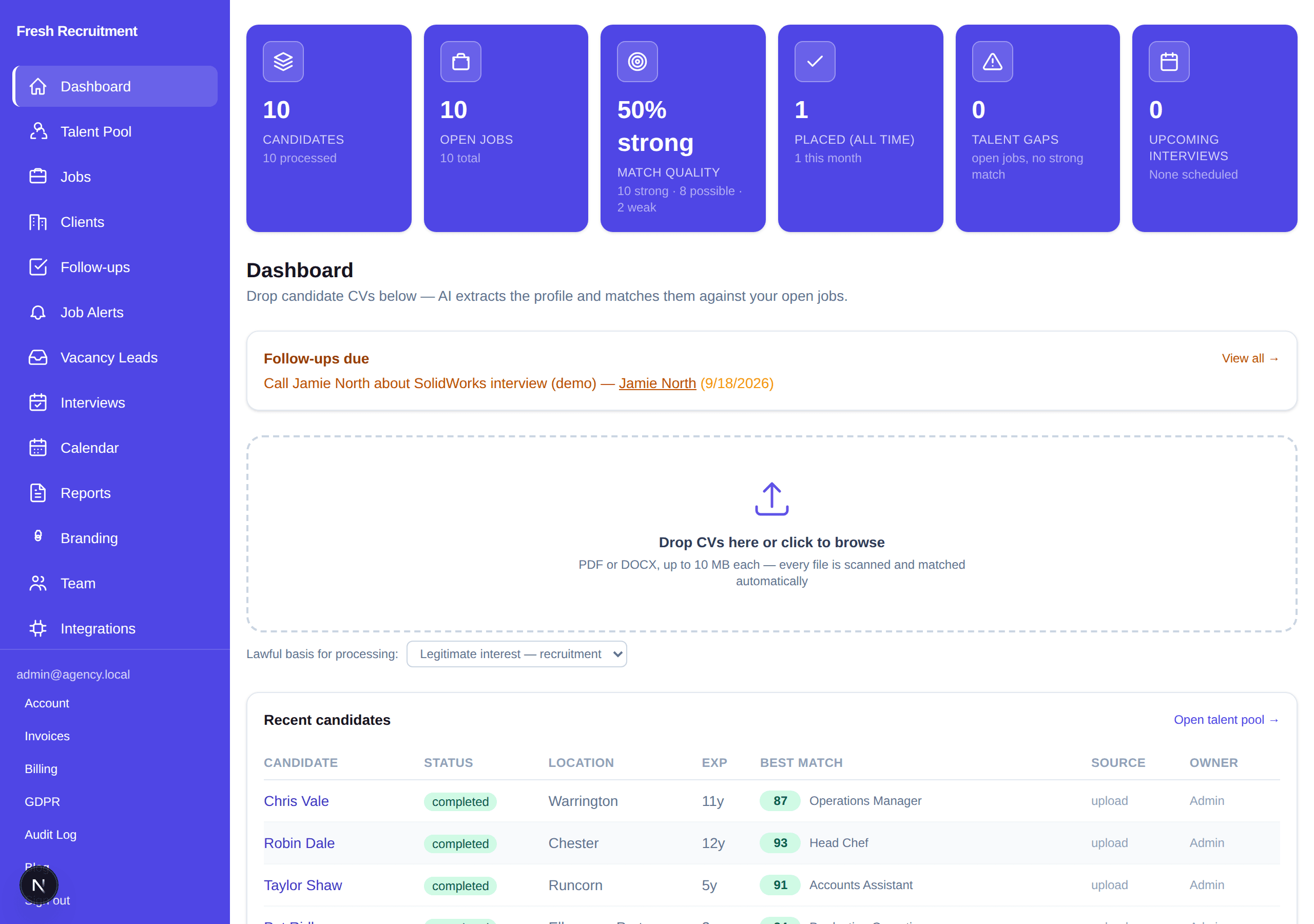
These are screenshots of the live interface, filled with a seeded “Fresh Recruitment” workspace. Names, roles and scores are made up. They are not live candidates or clients.

Agentic Hire dashboard demo: candidate and job stats, CV drop zone, and a recent-candidates table with made-up names.

Dashboard

Drop CVs, see pool stats, follow-ups and recent matches. Seeded Fresh Recruitment demo — not live client data.

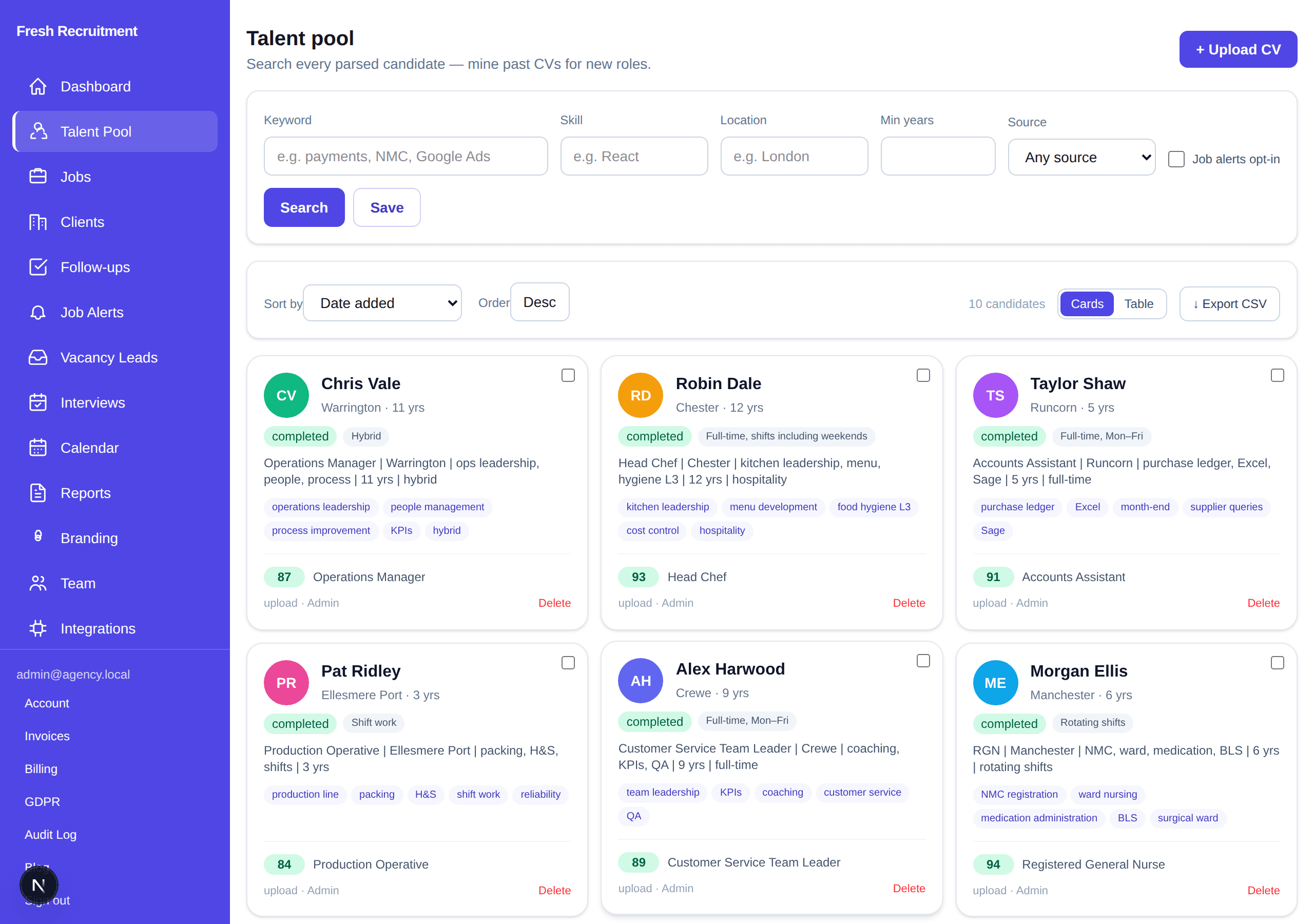
Talent pool demo with search filters and candidate cards for made-up names such as Chris Vale and Robin Dale.

Talent pool

Search every parsed candidate by skill, location and experience. Cards show fake demo people only.

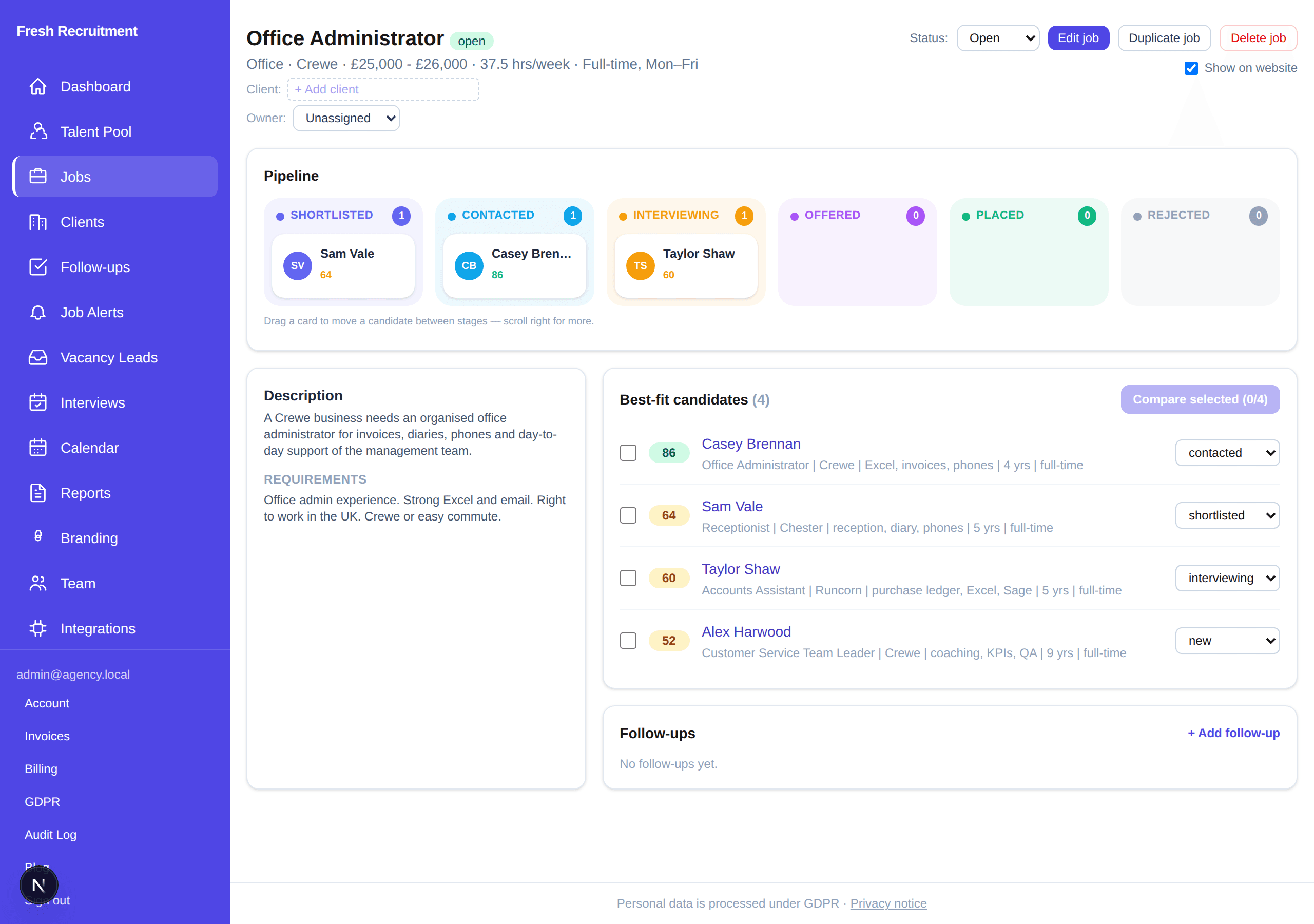
Demo job page for an Office Administrator role showing a pipeline board and ranked best-fit candidates with made-up names.

Job matches

Office Administrator (demo role) with a ranked shortlist and pipeline stages. Fake demo data.

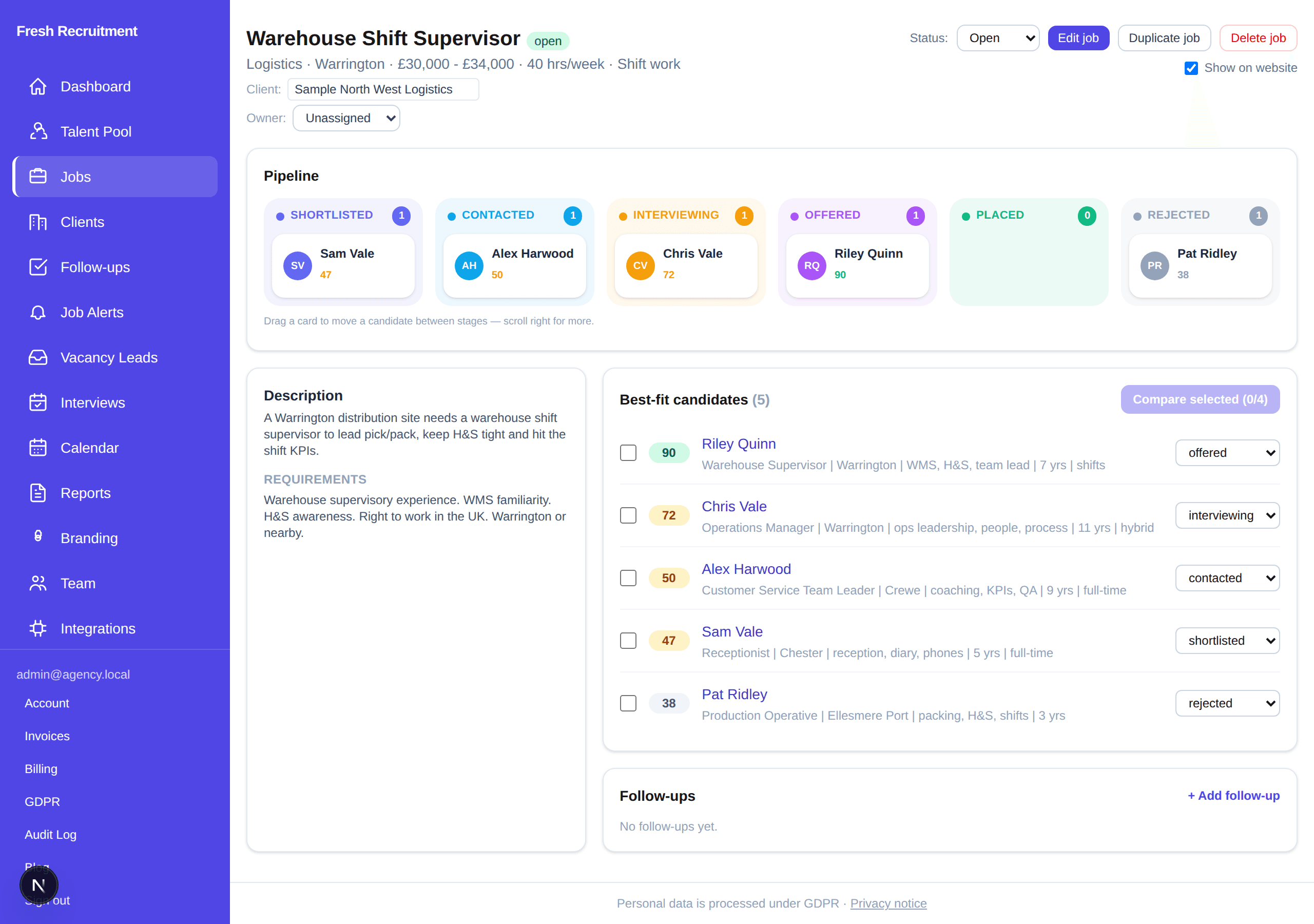
Demo pipeline for a Warehouse Shift Supervisor role with candidates in shortlisted, contacted, interviewing, offered and rejected columns.

Pipeline

Warehouse Shift Supervisor (demo) — drag candidates across stages instead of a spreadsheet. Fake demo data.

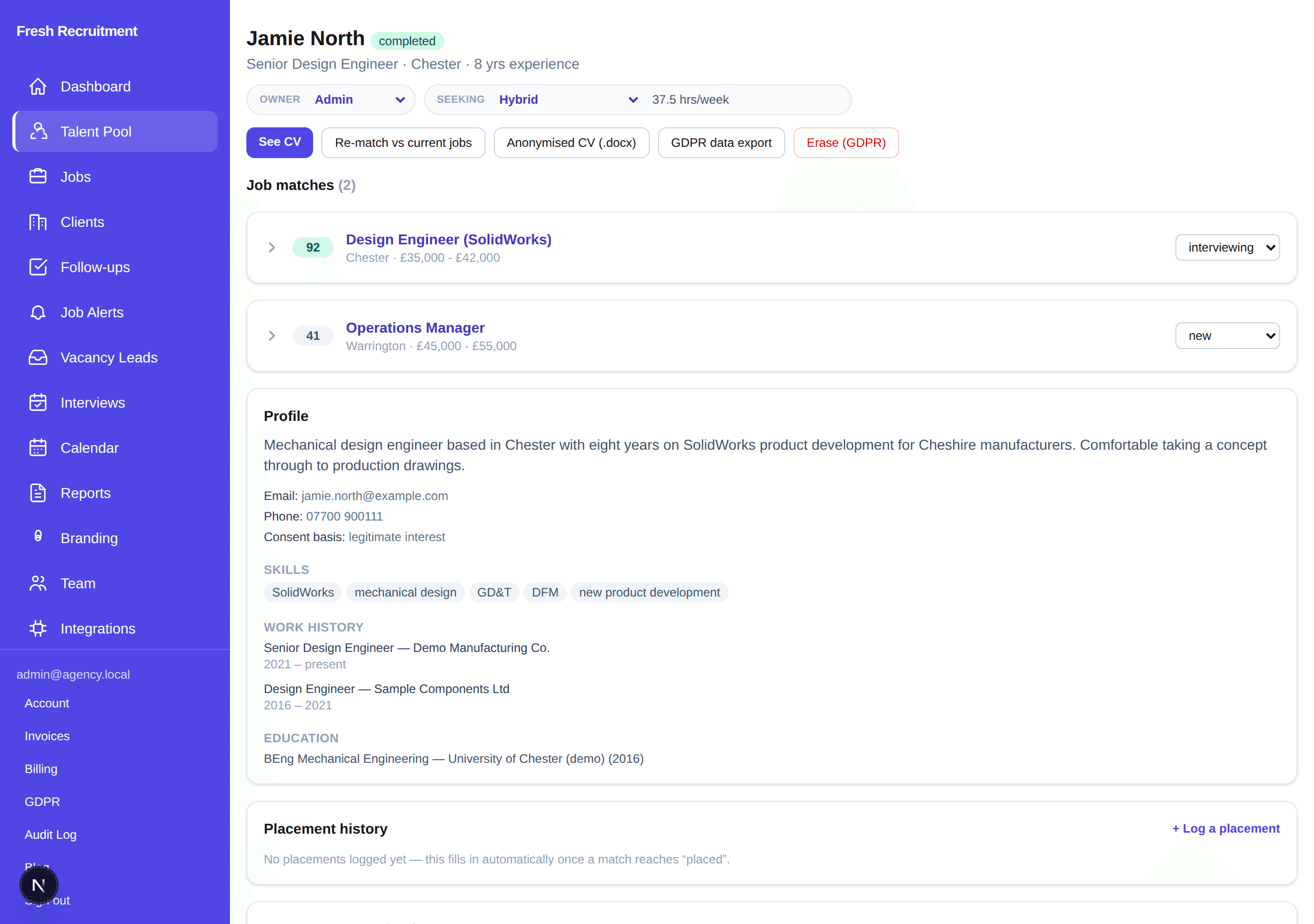
Demo candidate profile for Jamie North showing skills, work history, job matches, and GDPR export and erasure actions.

Candidate profile

Jamie North (demo): structured profile, job matches, anonymised CV, GDPR export and erasure. Not a real person.

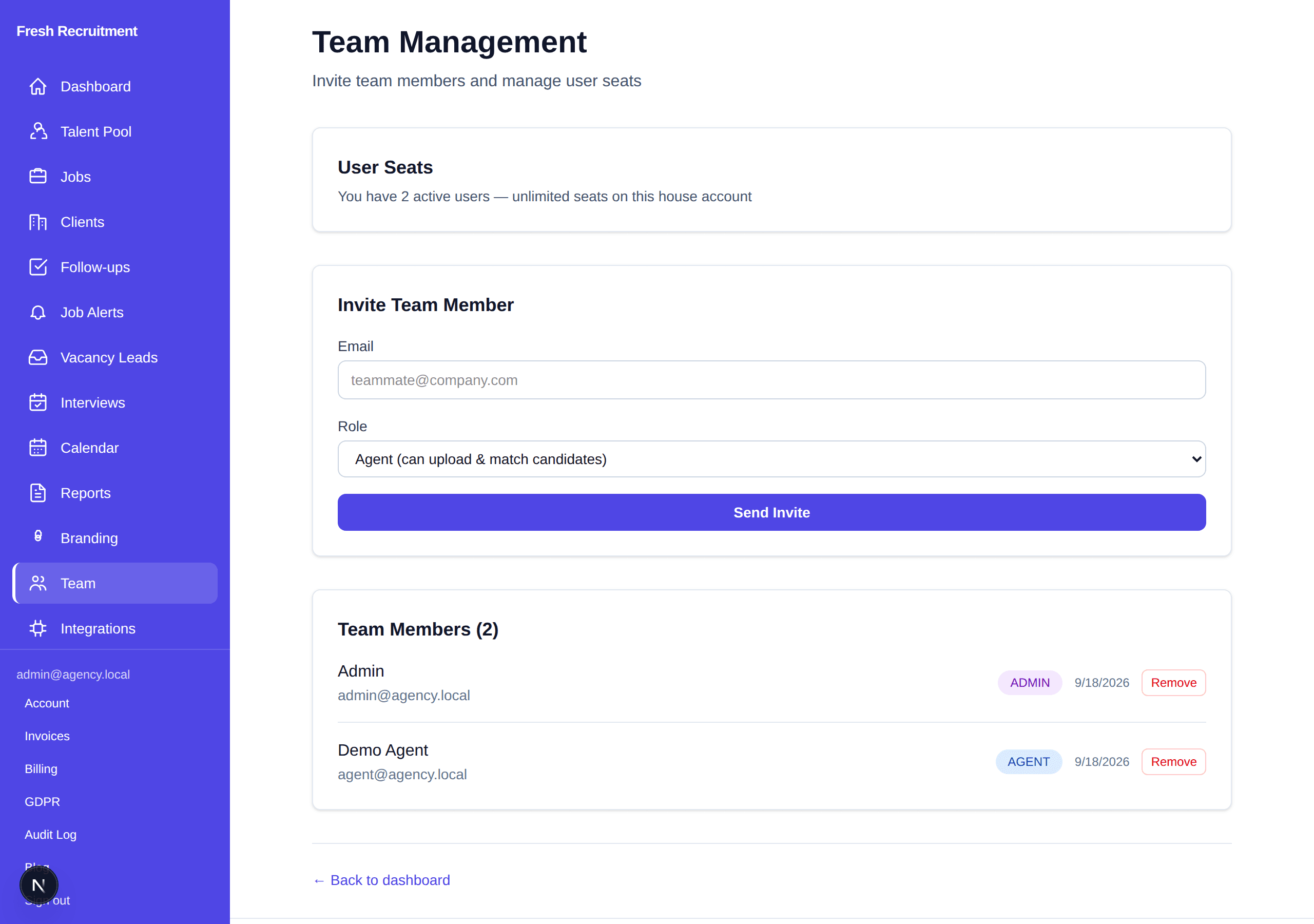
Team management demo with invite form and two demo users, Admin and Demo Agent.

Team seats

Invite Admin or Agent users. This screenshot is a demo workspace; seats for your team are quoted by email, not listed as a public price.

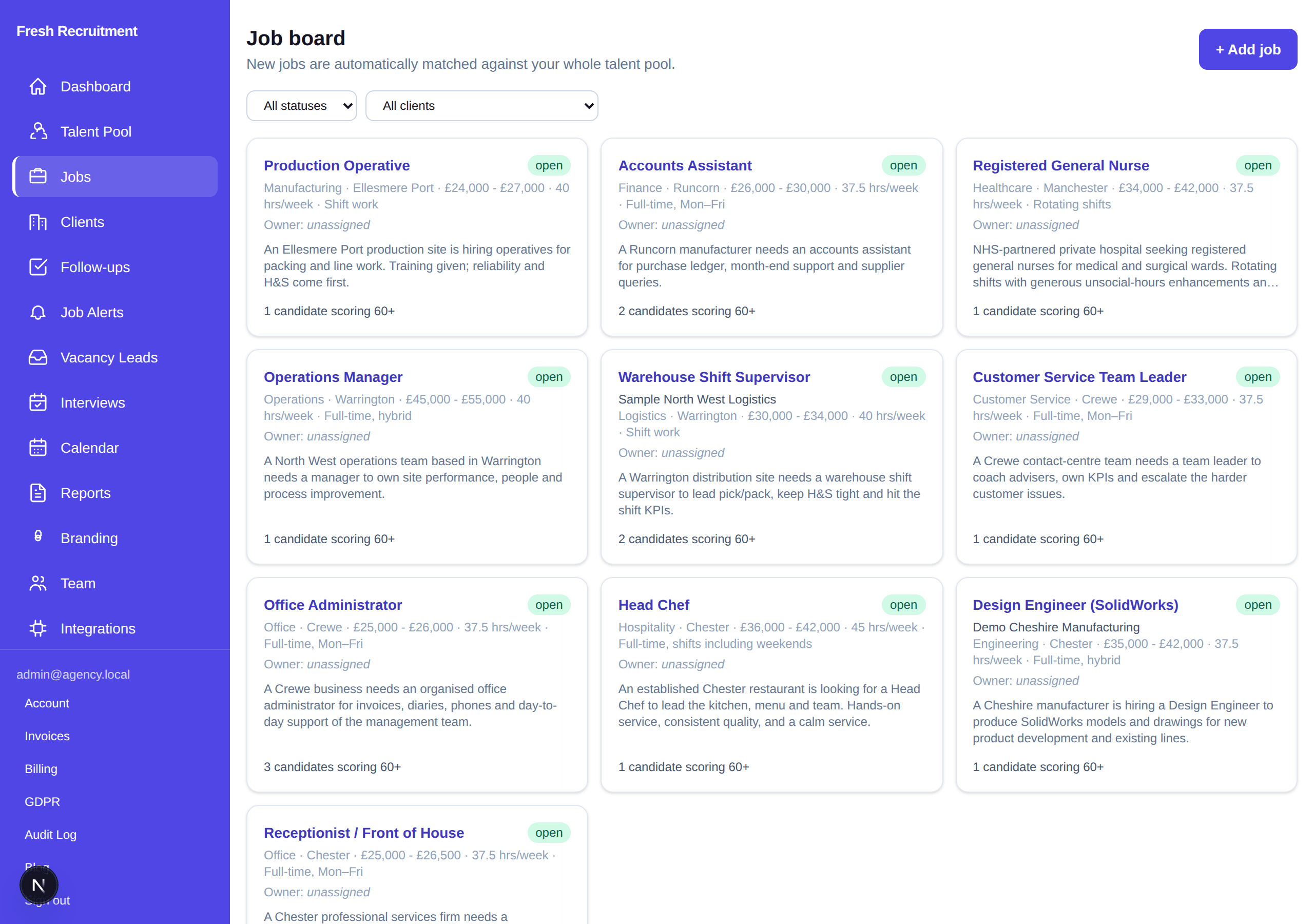
Demo job board showing made-up roles such as Production Operative and Accounts Assistant with match counts.

Job board

Every live role, with how many candidates already score well. New jobs auto-match the pool. Fake demo vacancies.

What’s in the ATS

The full desk — not just a seat count.

Seats are how your people log in. The product is everything they do once they are in.

Intake & matching

  • PDF and Word CVs read in full — not keyword-skimmed — with a structured profile stored
  • Email-in intake from Gmail, Outlook or IMAP, on a mailbox you connect
  • Every candidate scored against every open role, with plain-English reasoning
  • New roles auto-matched against the whole pool in the background
  • Job-spec import: upload a spec, get a branded advert and an instant shortlist
  • Talent-pool search by skill, location and experience; duplicates flagged

The desk

  • Mini-ATS pipeline per role: shortlisted → contacted → interviewing → offered → placed
  • One-click drafted outreach and client-submission emails
  • Anonymised, client-ready CVs (contact details stripped)
  • Side-by-side candidate comparison with a recommendation
  • Interviews, calendar, follow-ups and reports on the same desk

Team & records

  • Team seats with Admin and Agent roles — arranged with us, not self-serve checkout
  • Your branding on the workspace
  • CVs encrypted at rest; consent recorded per candidate
  • One-click subject-access export and right to erasure
  • Retention schedule and a full audit log

A day on the desk

Four steps, then the work is judgement.

The software does the reading and the rematching. Your team does the calling, the shortlisting and the offer.

1

CVs arrive

Drop a PDF or connect the intake mailbox. Lawful basis is recorded as they come in — no unnamed files on a desktop.

2

Matching runs

Every new CV is scored against every open role. Every new role is scored against the whole pool. You do not start from a blank search.

3

You work the shortlist

Move stages, send the drafted email, schedule the interview. The colour-coded spreadsheet is gone.

4

Packs go out; records stay tidy

Anonymised CVs for the hiring manager. Consent, retention and the audit log are already in the product — not a Friday afternoon job.

Talk to sales

Email contact@agentichire.co.uk with the subject Platform seats. Tell us your team size and how you hire today. We will quote and walk you through the desk. We usually reply within one working day.

Email contact@agentichire.co.uk

No public software price · No “start trial” · No card form on this page

FAQ

Common questions

What’s the difference between the agency and the software?

Two ways to work with us. The recruitment agency is already live for Cheshire and the North West: you upload a vacancy, we find and shortlist people, and you pay a flat 8% of salary only if someone starts — no placement, no fee. The software is the ATS that agency runs on, for your own hiring team: your candidates, your roles, seats arranged by email. This page is the software. Vacancy uploads stay on /vacancy.

Where’s the price?

There is no public software price on this page, and no self-serve trial or checkout. Email contact@agentichire.co.uk with the subject Platform seats, tell us your team size and how you hire today, and we will quote. The agency’s flat 8% is an agency fee, not a software price.

Are the screenshots real client data?

No. They are the real product interface filled with made-up demo data from a seeded “Fresh Recruitment” workspace (names such as Jamie North, Chris Vale, and demo roles in Crewe and Warrington). They are not live candidates or clients.

Who is the software for?

Hiring teams who want the same desk we use — in-house talent teams, and any organisation that would rather run intake, matching and pipeline themselves than hand the vacancy to our agency. Seats are set up by us after that email, not by an open signup form.

If we buy seats, do you still recruit for us?

Only if you want us to. Agency and software are separate. Many teams will pick one; some use the agency for a role and the ATS for the rest of the desk. Say which you mean when you email.

How do we get started?

Email contact@agentichire.co.uk with the subject Platform seats. We usually reply within one working day, quote for your team, and walk you through the product. There is no “start trial” button on this site.